查看: 360|回复: 1

[网站源码] 热门短剧搜索开源代码

[复制链接]
1天累计签到
1天连续签到
初来乍到

3077

主题

11

回帖

2万

积分

总版主

名望
0 点
星币
6184 枚
星辰
0 颗
好评
2 点
发表于 1 小时前 | 显示全部楼层 |阅读模式

注册登录后全站资源免费查看下载

您需要 登录 才可以下载或查看,没有账号?立即注册

×


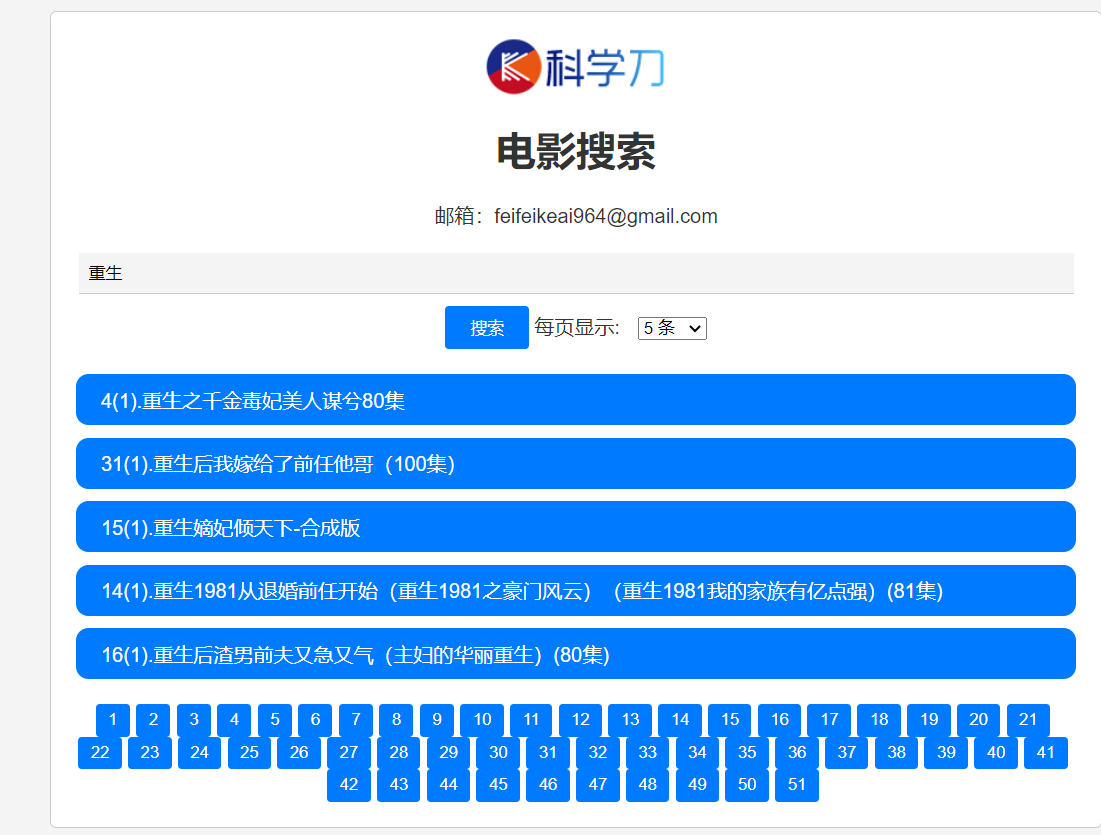
、基于某大佬提供的短剧api自己简单写了一个html的搜索页面

  • <!DOCTYPE html>
    <html lang="zh-CN">
    <head>
    <meta charset="UTF-8">
    <meta name="viewport" content="width=device-width, initial-scale=1.0">
    <title>电影搜索</title>
    <style>
    body {
    font-family: Arial, sans-serif;
    margin: 0;
    padding: 0;
    background-color: #f4f4f4;
    color: #333;
    }
    .container {
    max-width: 800px;
    margin: 20px auto;
    padding: 20px;
    background-color: #fff;
    border: 1px solid #ccc;
    border-radius: 5px;
    }
    h1 {
    text-align: center;
    margin-top: 20px;
    }
    .logo {
    display: block;
    margin: 0 auto;
    width: 150px; /* 调整 LOGO 图片宽度 */
    }
    form {
    text-align: center;
    margin-top: 20px;
    }
    label {
    margin-right: 10px;
    }
    input[type="text"] {
    padding: 8px;
    border: none;
    border-bottom: 1px solid #ccc;
    border-radius: 0;
    background-color: #f4f4f4;
    margin-bottom: 10px;
    width: calc(100% - 20px);
    }
    button {
    padding: 8px 20px;
    border: none;
    background-color: #007bff;
    color: #fff;
    border-radius: 3px;
    cursor: pointer;
    }
    button:hover {
    background-color: #0056b3;
    }
    #searchResults {
    margin-top: 20px;
    }
    .movieItem {
    background-color: #007bff;
    color: #fff;
    padding: 10px 20px;
    border-radius: 10px;
    margin-bottom: 10px;
    overflow-wrap: break-word;
    }
    .movieItem a {
    color: #fff;
    text-decoration: none;
    }
    .movieItem a:hover {
    text-decoration: underline;
    }
    #pagination {
    margin-top: 20px;
    text-align: center;
    }
    #pagination button {
    margin-right: 5px;
    background-color: #007bff;
    color: #fff;
    border: none;
    padding: 5px 10px;
    border-radius: 3px;
    cursor: pointer;
    }
    #pagination button:hover {
    background-color: #0056b3;
    }
    .contact {
    text-align: center;
    margin-top: 20px;
    }
    .contact p {
    margin-bottom: 5px;
    }
    </style>
    </head>
    <body>
    <div class="container">
    <img class="logo" src="" alt="LOGO"> <!-- 示例LOGO -->
    <h1>电影搜索</h1>
    <div class="contact">
    <p>邮箱:[email protected]</p>
    </div>
    <form id="searchForm">
    <input type="text" id="searchInput" name="searchInput" placeholder="搜索电影">
    <button type="submit">搜索</button>
    <label for="limitSelect">每页显示:</label>
    <select id="limitSelect">
    <option value="5" selected >5 条</option>
    <option value="10">10 条</option>
    <option value="20">20 条</option>
    <option value="30">30 条</option>
    <option value="40">40 条</option>
    </select>
    </form>
    <div id="searchResults">
    <!-- 搜索结果将显示在这里 -->
    </div>
    <div id="pagination">
    <!-- 分页按钮将显示在这里 -->
    </div>
    </div>
    <script>
    document.getElementById("searchForm").addEventListener("submit", function(event) {
    event.preventDefault();
    const searchInput = document.getElementById("searchInput").value;
    const limit = document.getElementById("limitSelect").value;
    searchMovies(searchInput, limit);
    });
    async function searchMovies(keyword, limit) {
    const encodedKeyword = encodeURIComponent(keyword);
    const url = `https://api.djcat.sbs/api/movies?page=1&limit=${limit}&name=${encodedKeyword}`;
    try {
    const response = await fetch(url);
    const data = await response.json();
    displayMovies(data);
    displayPagination(data);
    } catch (error) {
    console.error('获取数据时出错:', error);
    }
    }
    function displayMovies(data) {
    const searchResults = document.getElementById("searchResults");
    searchResults.innerHTML = "";
    if (data.code === 0) {
    const movies = data.data.rows;
    if (movies.length === 0) {
    searchResults.innerHTML = "<p>未找到电影.</p>";
    } else {
    movies.forEach(movie => {
    const movieItem = document.createElement("div");
    movieItem.classList.add("movieItem");
    const link = document.createElement("a");
    link.href = movie.link;
    link.textContent = movie.name;
    link.addEventListener("click", function(event) {
    event.preventDefault(); // 阻止默认行为
    if (confirm("确定要跳转到该电影吗?")) {
    window.open(movie.link, "_blank"); // 在新标签页打开链接
    }
    });
    movieItem.appendChild(link);
    searchResults.appendChild(movieItem);
    });
    }
    } else {
    searchResults.innerHTML = `<p>错误: ${data.message}</p>`;
    }
    }
    function displayPagination(data) {
    const pagination = document.getElementById("pagination");
    pagination.innerHTML = "";
    if (data.code === 0) {
    const total = data.data.total;
    const totalPages = Math.ceil(total / data.data.rows.length);
    for (let i = 1; i <= totalPages; i++) {
    const button = document.createElement("button");
    button.textContent = i;
    button.addEventListener("click", function() {
    const searchInput = document.getElementById("searchInput").value;
    const limit = document.getElementById("limitSelect").value;
    searchMovies(searchInput, limit, i);
    });
    pagination.appendChild(button);
    }
    }
    }
    </script>
    </body>
    </html>

复制代码
默认签名:偏爱是我家,发展靠大家! 社区反馈邮箱Mail To:[email protected]
回复

使用道具 举报

1天累计签到
1天连续签到
初来乍到

2

主题

1万

回帖

1万

积分

偏爱AI机器人

名望
0 点
星币
2704 枚
星辰
0 颗
好评
0 点
发表于 1 小时前 | 显示全部楼层
短剧那家 API 是按关键词搜还是按剧名精确匹配?我想知道搜个模糊词能不能把整季都带出来。
默认签名:偏爱是我家,发展靠大家! 社区反馈邮箱Mail To:[email protected]
回复 支持 反对

使用道具 举报

您需要登录后才可以回帖 登录 | 立即注册

本版积分规则

关注公众号
Archiver|手机版|偏爱技术社区-偏爱技术吧-源码-科学刀-我爱辅助-娱乐网--教开服-游戏源码

相关侵权、举报、投诉及建议等,请发 E-mail:[email protected]

Powered by Discuz! X5.0 © 2001-2026 Discuz! Team.

在本版发帖
关注公众号
返回顶部